
October
Select recipients of scheduled reports
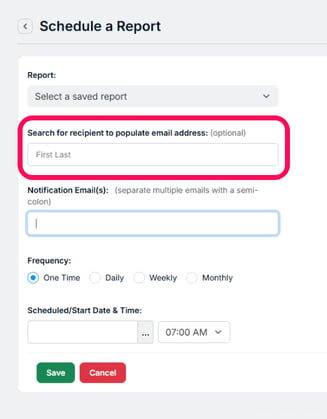 We upgraded the Scheduled Report page with a search for the recipient's name and then populate the email address. Continue to search for others, one at a time, and it will add their email address to the email field. If a person who does not have an email address is selected, a "The selected recipient does not have an email address" notification is given.
September
Print directly from the Group Info page
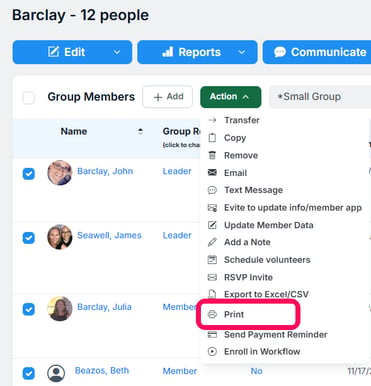
We added an Action option on the Group Info page to print the group roster or those selected. It includes the columns exactly as you see them (i.e. according to the selected Layout). Preview the print first and then Customize or Edit (if appropriate) the Layout to best fit your printed or pdf size expectations.
Visual impairment accessibility for your email and content pages
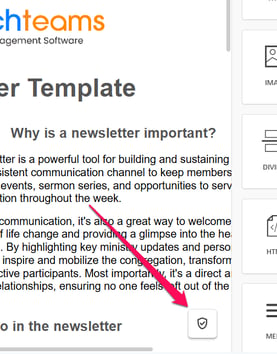
Our email editor now checks for visual impairment accessibility and recommends fixes to your email or content page. This helps people with visual impairments better engage your content using their screen reader. Click the badge icon shown below to scan your content. It will identify and help you fix issues related to accessibility, image weight, missing links, HTML size, and more, without leaving the builder. Ensuring online content is accessible is a concept that's been around a while, and now we are bringing it to your email and landing pages.
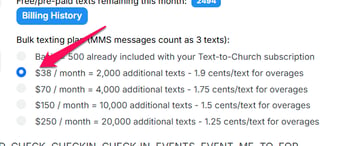
$38 for 2,000 texts
To help with texting overage costs, we added a bulk texting plan that is $38 per month for 2,000 texts + 1.9 cents/text for overages. You can adjust the pricing level to match your church's need by going to Communicate > Text > Settings.
August
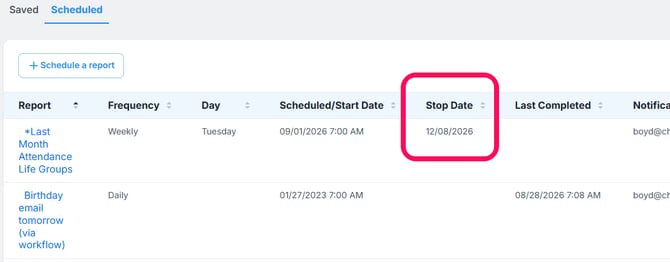
Scheduled Reports Stop Date
For reports that you only want to schedule for certain ministry seasons (like a small groups semester), you can now add a Stop Date when setting up the Scheduled Report.
Access The Member App On Your Computer
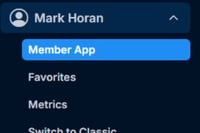
To access the Member App on your computer or any device, click on your name in the main menu and then the Member App link. A great way to have the App experience on your laptop or anywhere else.
Customize Favorites
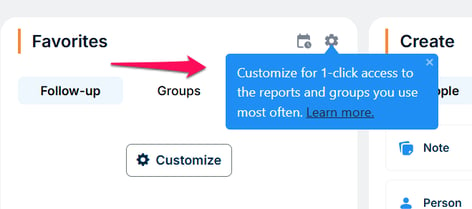
We added a pop-up to draw users who have not used the Favorites card for Groups or Reports to learn more about it and to start using it. It is a helpful shortcut for users to access the groups and reports they use the most. Everyone can hover over the settings icon for more info at any time.
Registration Tickets Check-in By Text
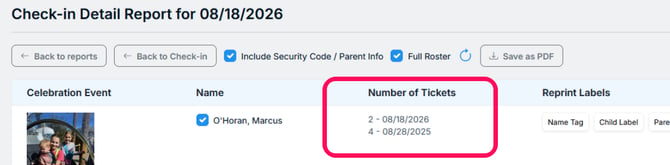
Check-in Settings E7 tells the system to send a text confirming registration when someone registered texts CHECK or CHECK-IN and that view is being used. The text response back is used as a ticket to the event. We added content to this text message for any registration fields, like Number of Tickets, that used the "Additional Registrants" option.
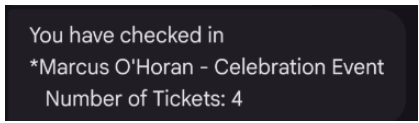
If someone registered more than once, it shows Number of Tickets for both registrations. If a staff or key volunteer opens up the Check-in Detail report, they will see this as well.
Volunteer Scheduling - Email All When Finding A Substitute
Find A Sub is a popular option for staff and volunteers responsible for staffing a team for Sunday Mornings or any event. The initial release of this feature required a person to email one potential sub at a time to ask to replace them. This addition adds an option for an invited volunteer to email all the Subs.
May
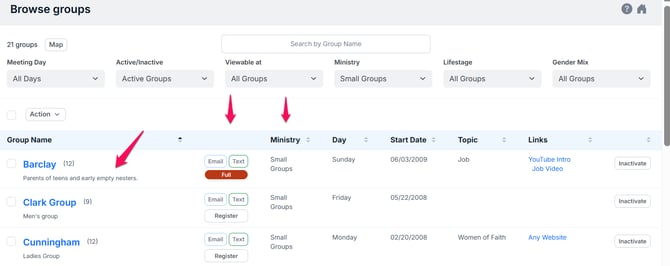
Browse Groups User Interface
We moved a few things around to make better use of the space on the Browse Groups page. The description is now under the group name. The buttons are realigned and "Ministry" was moved to the first column listed.
There were a couple of other performance and filtering upgrades to improve the User Experience as well.
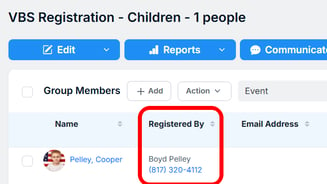
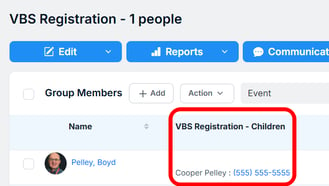
Secondary registration in group view
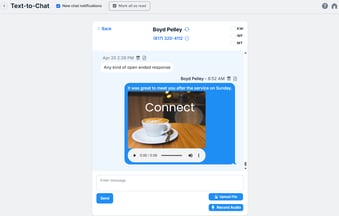
MMS in Chat
April
Help members log in on their computers
Click the new "Member Login" button on your Staff Login page to copy and share the link members and leaders should use to access Churchteams on their computer. Encourage them to save this link as a bookmark or favorite. It logs them into the App with their unique information.
Inactivate a contribution fund
Move a fund you no longer use to the bottom of the list by checking it in the new inactive column (Giving > Settings > Designations/Funds). All contributions and registrations are preserved. You'll see "Inactive" next to the fund name throughout the application.
Set up and manage bulk text pricing
If you send 4,000, 10,000, 20,000, or more texts each month, you can save money by choosing a bulk texting plan (Communicate > Text > Settings). Billing is calculated on the 1st of the following month. On that page, click the blue button to save payment information and set up Auto-pay.
Deceased actions retain family roles
A recent upgrade to Deceased actions (People > Settings > Deceased Actions) automatically adds appropriate family and marital roles to the Related To section of each person's profile.
Recurring contribution change notification
Changes made to a person's recurring contribution are now emailed to the addresses in BOTH the "Contribution change email" (Giving > Settings > Other Options) AND the "Notifications for new or canceled recurring contributions" (Giving > Settings > Online Giving > Online Giving Options)
"Check All" dates for volunteer invitations
When sending an invitation through our Service Volunteers feature, we recently added a "Check All" option to simplify the selection of Draft Schedule dates for the schedule creator. This feature consolidates email & text invitations sent to volunteers.
"Add Another" Related To relationship
We recently released an "Add Another" button in the Related To "Add Relationship" area. This allows the entry of multiple Related To relationships at one time rather than going back and forth to the member's profile page.
March
MMS text messages
Send images to make texts more relatable. Record and send audio messages up to 2 minutes. Create longer texts with up to 1600 character capacity. Pricing is 1 MMS = 3 SMS.
Major User-Interface Improvements
All year long we upgraded the user-interface of various pages. But in one major release significant upgrades were made to the look and feel of : (1) Registration forms, (2) Email pages, and (3) Reports.
Check-in by Roster
Allows you to do check-in on many devices at once by leveraging this new upgrade to the detail report once a check-in session has been started.
February
See and add people to email lists from their profile page
You can now view and edit email lists for an individual right from their people profile page. This was just added as a dropdown in the email section. This will make it much easier to add people to these lists as needed. Learn more about Email Lists.
See Deposits AND Credits on the Online Deposit Reconciliation report
Recognize serving team and staff anniversaries
We added Month as an option under the Group Join Date Range filter so that you can run a report that recognizes the months someone was added to any group, but especially serving team and staff groups. Save and schedule this report to run every month so that you have an automated reminder to celebrate anniversaries based on a given month. Find this under Filters > Group Involvement under Group join date range.
Payment reminders are sent to both children and parents
Our best practice for youth and child registrations is to register parents first and children secondly. (More Info) A recent upgrade will text linked parents when a payment reminder is sent through the child registration group.
Volunteer substitute list shows non-adult roles
Volunteers being able to select their own substitute is a favorite feature. Children's ministry often includes older children and youth volunteers. To help volunteers recognize that more easily, we added a tag to the substitute list that identifies substitutes that are not adults.
Taking attendance from an emailed link or the Member App
The "Completes Meeting Reports" group column option has been renamed "Attendance and Group Access". Selecting "Yes" for a person in a group gives that person access to take attendance from the emailed reminder and gives them access to that group from within the Groups section of App
Deceased flagged in "Related to" section
For many reasons our best practice is to move deceased people into their own family and connect them via the Related to section. (More Info) We now flag that relationship for easy recognition using the Dec badge. Hover over it to see the full word.
Related To section now includes deceased to deceased
When the first spoused is deceased and the second one passes, there is now an option to connect them in the Related to section as Deceased to Deceased. It used to be limited to Surviving Spouse to Deceased.
It is much easier to edit the names of group roles
Group and Financial Admins have always been able to add and remove group roles based on the area of ministry a group is in. With this upgrade, we not only upgraded, the User-Interface, but we added the ability to edit the name of a group role simply by clicking on it. Find this at Groups & Events > Settings > Group Roles.